
- Published on Thursday, October 12, 2023, last updated
GitHub Enterprise Pricing (2026): Cloud vs Server Costs
- Authors

- Name
- Arthur Coudouy
- @arthurcoudouy
GitHub Enterprise costs $21 per user per month (prices checked on github.com/pricing on November 5, 2026). The same license covers GitHub Enterprise Cloud and GitHub Enterprise Server, and GitHub now includes access to GitHub Copilot in the Enterprise plan.
The license is only part of the bill: security add-ons, extra Actions minutes, storage and, for Enterprise Server, your own infrastructure and maintenance add up. This guide covers each of them.
Table of Contents
- GitHub pricing in 2026: Free vs Team vs Enterprise
- What is GitHub Enterprise?
- GitHub Enterprise Cloud vs GitHub Enterprise Server
- Is GitHub Enterprise free? Trials
- GitHub vs GitHub Enterprise: which one do you need?
- Factors Affecting GitHub Enterprise Cost
- GitHub Enterprise Server pricing
- Additional Costs to Consider
- Comparing GitHub Enterprise with Other Solutions
- FAQs
- BONUS: How to set up GitHub Enterprise Server on Azure (for dummy's)
- Conclusion
GitHub pricing in 2026: Free vs Team vs Enterprise
| Plan | Price | Key inclusions |
|---|---|---|
| GitHub Free | $0 | Unlimited public and private repositories, 2,000 Actions minutes/month, 500 MB Packages storage, community support |
| GitHub Team | $4 per user per month | Required reviewers, code owners, draft pull requests, repository rules, 3,000 Actions minutes/month, 2 GB Packages storage, web-based support |
| GitHub Enterprise | $21 per user per month | Copilot access, SAML SSO, SCIM, audit log API, data residency, GitHub Connect, SOC 1 / SOC 2 Type 2 reports, 50,000 Actions minutes/month, 50 GB Packages storage |
Source: GitHub pricing page, checked November 5, 2026. GitHub does not publish a separate annual price on that page.
GitHub add-on prices
| Add-on | Price |
|---|---|
| GitHub Secret Protection | $19 per active committer per month |
| GitHub Code Security | $30 per active committer per month |
| GitHub Codespaces | From 0.07 per GB of storage |
| Git Large File Storage | $5 per month for 50 GB of bandwidth and 50 GB of storage |
| Premium support | On request (Enterprise only) |
Sources: GitHub security plans and GitHub pricing. Secret Protection and Code Security are available on Team and Enterprise; together they form GitHub Advanced Security.
What is GitHub Enterprise?
GitHub Enterprise is the GitHub plan for larger organizations. On top of everything in Team, it adds enterprise-grade identity and compliance (SAML single sign-on, SCIM provisioning, audit log API, data residency, compliance reports), more Actions minutes and storage, and the choice between a GitHub-hosted (Cloud) or self-hosted (Server) deployment.
GitHub Enterprise Cloud vs GitHub Enterprise Server
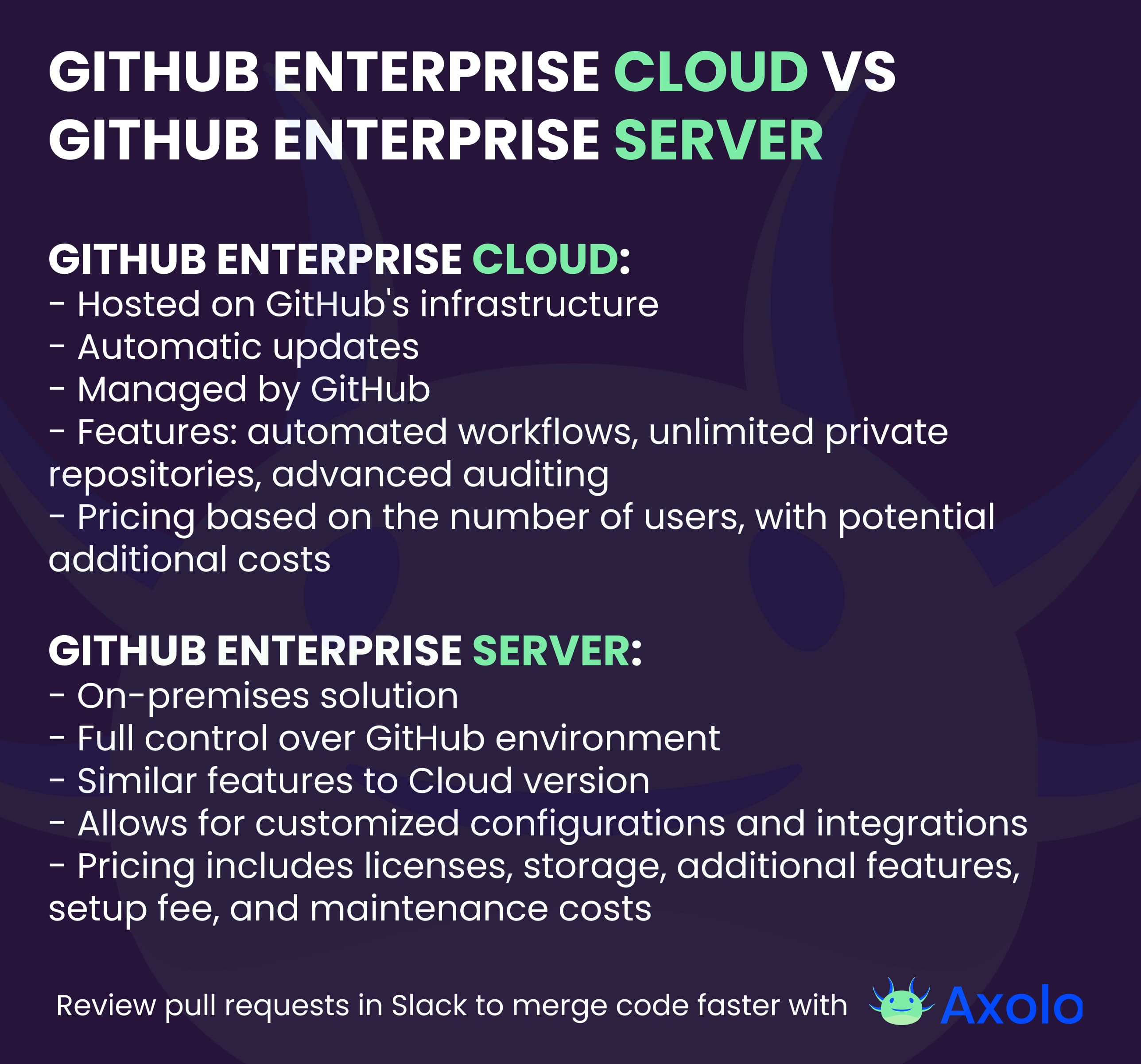
Both deployments are part of the same GitHub Enterprise plan, at the same per-user price.
- GitHub Enterprise Cloud is hosted and updated by GitHub. You pay the license, plus any usage beyond the included Actions minutes and storage.
- GitHub Enterprise Server is a virtual appliance you run on your own servers or cloud account (AWS, Azure, Google Cloud, VMware…). You pay the same license, plus the infrastructure, backups and the time of the administrators who keep it up to date. See the Azure installation walkthrough at the end of this article.
How GitHub counts Enterprise users
GitHub bills unique users across your deployments. Someone who works in several Cloud organizations and Server instances consumes a single license, as long as license usage is synced between Server and Cloud (GitHub Docs).
There are two billing models (GitHub Docs):
- Usage-based billing: you pay every month for the licenses actually consumed, instead of a fixed number of seats (details).
- Volume or subscription agreement: a fixed bundle of licenses covering Cloud and Server, set up with GitHub Sales.
Is GitHub Enterprise free? Trials
GitHub Enterprise is not free, but you can try it:
- GitHub Enterprise Cloud: a 30-day free trial. GitHub's pricing page describes it as one trial that includes GitHub Enterprise, Copilot and Advanced Security (trial docs).
- GitHub Enterprise Server: a 45-day evaluation of the virtual appliance; contact GitHub Sales for an extension (trial docs).
GitHub vs GitHub Enterprise: which one do you need?
- GitHub Free or Team is enough for most small and mid-size teams: private repositories, pull request reviews, code owners and Actions are all there.
- GitHub Enterprise is worth $21 per user when you need SSO and SCIM, audit logs, data residency, compliance reports, more Actions minutes, Copilot for everyone, or a self-hosted GitHub Enterprise Server.
At Axolo, many of our customers run GitHub Enterprise Cloud or Server. Axolo works with both (GitHub Enterprise Server setup) and opens one Slack channel per pull request.
Axolo is a Slack app to help techteams review pull request seamlessly
Factors Affecting GitHub Enterprise Cost
The overall cost of GitHub Enterprise is influenced by several factors that go beyond the basic subscription fee. Here are some of the key elements to consider:
Number of Users
- The most straightforward factor affecting cost is the number of users who will be accessing the platform. Both GitHub Enterprise Cloud and GitHub Enterprise Server have pricing models that scale with the number of users, making this a primary consideration in your budget.
Storage Needs
- Depending on your organization's codebase size and the number of repositories you manage, storage can become a significant cost factor. GitHub Enterprise Cloud has options for additional storage at an extra fee, while GitHub Enterprise Server storage costs will depend on your own infrastructure.
Add-ons and Integrations
- GitHub Enterprise offers a range of add-ons and third-party integrations that can enhance its functionality. Whether it's integrating with CI/CD pipelines, project management tools, or advanced security features, these add-ons can incur additional costs.
Understanding these factors will help you get a clearer picture of the total cost of ownership for GitHub Enterprise, enabling you to plan your budget more effectively.
GitHub Enterprise Server pricing
GitHub Enterprise Server uses the same GitHub Enterprise license: $21 per user per month. What changes is everything around it: the servers or cloud instances that run the appliance, storage, backups, and the time your team spends on upgrades and monitoring.
Add-ons are billed on top of the license, for example GitHub Secret Protection (30 per active committer per month) and Premium support. You can find all features on the dedicated pricing page, and GitHub also offers a pricing calculator.
Axolo User Experiences
2480+ developers online

Additional Costs to Consider
While the subscription fee is a major component, the overall cost of GitHub Enterprise Server involves several other financial considerations.
Training Costs
Onboarding new users to GitHub Enterprise Server often necessitates specialized training. This is particularly true for team members who may not be familiar with GitHub's extensive feature set. Training can either be done in-house, which takes up internal resources, or outsourced to experts, which comes with its own price tag.
Migration Costs
Switching to GitHub Enterprise Server from another version control system or a different GitHub plan isn't just a click of a button. The migration process can be complex and time-consuming, involving data transfers, system configurations, and potential downtime. These complexities often translate into additional costs that should be factored into the budget.
Maintenance Costs
If you opt for GitHub Enterprise Server, remember that you're essentially running your own GitHub instance. This means you'll need to maintain the servers it runs on. Maintenance isn't just about the occasional update; it's about ensuring uptime, security, and performance, all of which require ongoing attention from system administrators.
Backup and Recovery
A robust backup and recovery solution is not just good practice; it's essential for any enterprise-level system. While GitHub Enterprise Server does offer some built-in backup solutions, larger organizations often opt for more comprehensive third-party solutions, which come at an additional cost.
Enable your team to mergepull requests faster with Axolo
Comparing GitHub Enterprise with Other Solutions
When evaluating GitHub Enterprise, it's useful to consider how its features stack up against other source code management tools. Below is a table that outlines some of the most popular alternatives and their key features.
| Tool | Key Features |
|---|---|
| GitHub Enterprise | Advanced security, granular access, on-prem/cloud |
| GitLab Enterprise | CI/CD integration, auto DevOps, Kubernetes support |
| Bitbucket Server | Jira integration, built-in CI/CD, code insights |
| Azure DevOps | Boards for planning, repos, CI/CD pipelines |
| Perforce Helix Core | High-scale version control, multi-site collaboration |
Each tool has its own set of features and capabilities, and the right choice will depend on your organization's specific needs. However, GitHub Enterprise stands out as a comprehensive solution that offers a wide range of features and integrations, making it a popular choice for larger organizations.
FAQs
What is the starting price for GitHub Enterprise?
$21 per user per month, for both GitHub Enterprise Cloud and GitHub Enterprise Server (GitHub pricing page, November 2026).
How is pricing determined?
GitHub bills the number of unique users who consume a license across Cloud and Server, either monthly (usage-based billing) or through a volume agreement. Add-ons, extra Actions minutes and storage are billed on top.
Are there any hidden costs?
While the subscription fee is straightforward, additional costs can include training, migration, and maintenance. It's important to factor these into your total budget.
Can I switch between GitHub Enterprise Cloud and Server?
Yes, it's possible to switch between the two, but be aware that this may involve migration costs and potential downtime.
Is there a free trial available?
Yes. GitHub Enterprise Cloud has a 30-day free trial, and GitHub Enterprise Server has a 45-day evaluation.
BONUS: How to set up GitHub Enterprise Server on Azure (for dummy's)

I had instance on Azure, that I decided to write how to do it in the most EASIEST way. This article was written in tears and blood, using the official GitHub guide, and a lot of resources on the internet.
This article does not aim to give all aspects of the GitHub Enterprise Server installation, but only to give the minimum to get started.
⚠️ Do not follow the Azure procedure from the marketplace, I don't know if they changed anything or if it's my fault, but it didn't work for me.
Step 1: Creating a resource group in Azure
If you already have a resource group, you can skip this step. If you don't, please follow the official Azure documentation.
Step 2: Creating the GitHub Enterprise Server virtual machine
If you want to dive into all the requirements, you can find them in the official GitHub documentation. I will only give the minimum to get started.
According to my test, even if you're only a team of 5, you will need at least the Standard_E4_v3 for the VM size. I wasted a lot of time trying to install something less powerful. At first it worked, but you won't be able to open some administration panels (which was the most frustrating part of this whole adventure).
I. Finding the GitHub Enterprise Server image
Type $ az vm image list --all -f GitHub-Enterprise | grep '"urn":' | sort -V, and wait ...
Choose the GES image you want to install, and copy it. For example, I chose GitHub:GitHub-Enterprise:GitHub-Enterprise:3.8.3.
II. Creating the VM
⚠️ Do not forget to create a dedicated resource group in Azure first. My resource group for this article is called "ResourceGroup1".
GitHub now tells us to type the following command and to fill in all the variables:
$ az vm create -n VM_NAME -g RESOURCE_GROUP --size VM_SIZE -l REGION --image APPLIANCE_IMAGE_NAME --storage-sku Premium_LRS
Which did not worked for me that easily. I had to add the --admin-username variable, and to remove the --storage-sku variable. This is what it looked like (gitHubenterpriseservertest is the name of my virtual machine):
az vm create -n gitHubenterpriseservertest -g ResourceGroup1 --size Standard_E4_v3 -l eastus --image GitHub:GitHub-Enterprise:GitHub-Enterprise:3.8.3 --admin-username arthurcoudouy
Step 3: Opening the ports of your GES virtual machine
Don't try to outsmart the procedure and follow methodically each port you need. If you don't open the required ports, you will face unknown errors in the future, and god, you don't want that.
As I did not want to implement any kind of security, I opened all the ports. I know, it's not the best practice, but I did not want to show you all my security skills here, I just wanted to install a GitHub Enterprise Server instance.
In theory, it looked like this:
$ az vm open-port -n VM_NAME -g RESOURCE_GROUP --port PORT_NUMBER
In practice, Azure asks you to establish some priority starting at 100. Again, as I did not want to dive into these settings, I just added 1 in priority for each port.
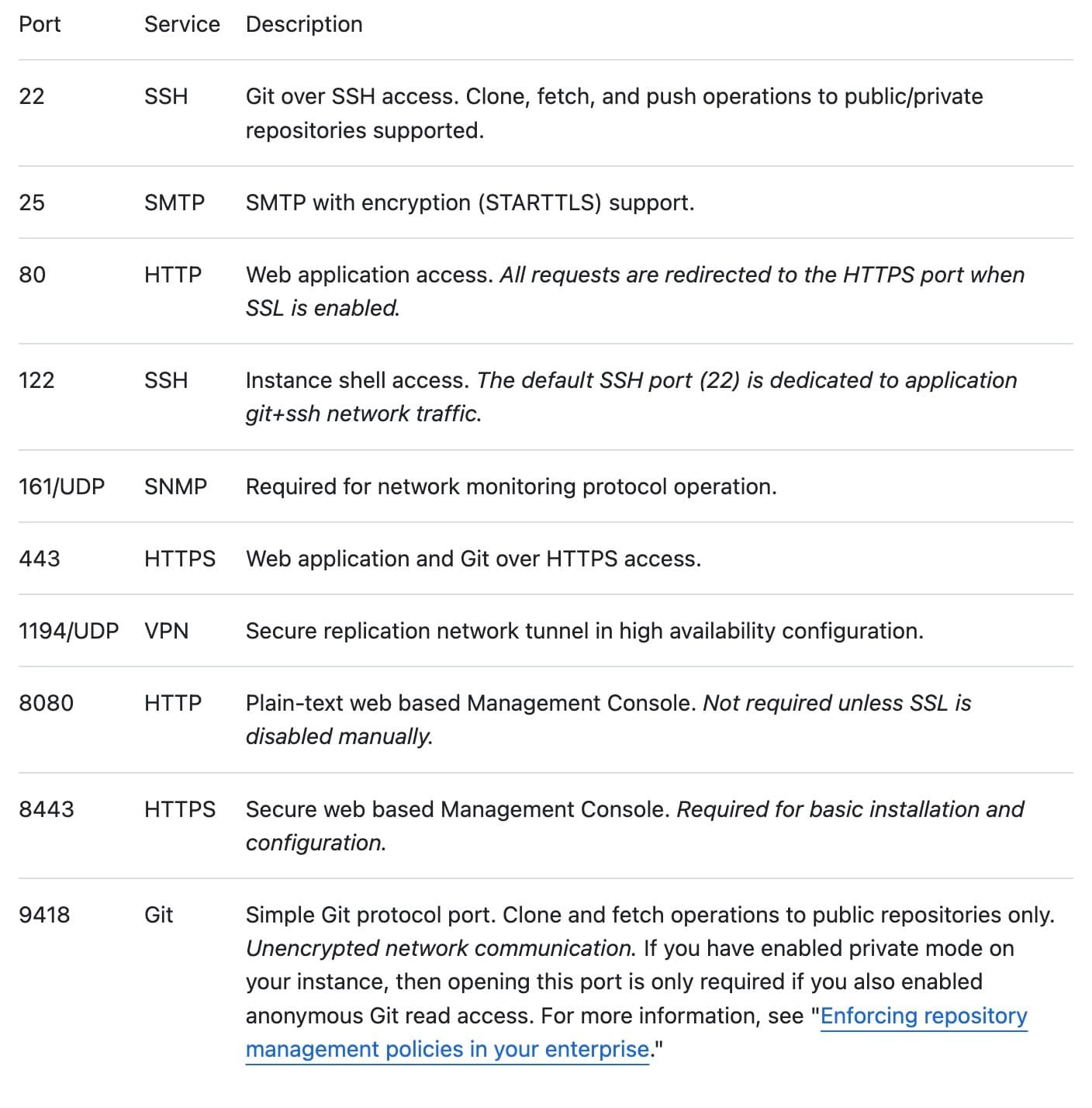
My list of commands looked like this (type each one of them in your terminal):
az vm open-port -n gitHubenterpriseservertest -g ResourceGroup1 --port 22 --priority 100
az vm open-port -n gitHubenterpriseservertest -g ResourceGroup1 --port 25 --priority 101
...
az vm open-port -n gitHubenterpriseservertest -g ResourceGroup1 --port 80 --priority 109
Step 4: Attaching a new unencrypted data disk to the VM
As before, the theory gives us this:
$ az vm disk attach --vm-name VM_NAME -g RESOURCE_GROUP --sku Premium_LRS --new -z SIZE_IN_GB --name ghe-data.vhd --caching ReadWrite
And the --sku Premium_LRS did not work for me as well. My command looked like this:
az vm disk attach --vm-name gitHubenterpriseservertest -g ResourceGroup1 --new -z 150 --name ghe-data.vhd --caching ReadWrite
Axolo is a Slack app to help techteams review pull request seamlessly
Step 5: Configuring the GitHub Enterprise Server virtual machine
- Check that your virtual machine is ready We now need to wait that your virtual machine is ready through a specific command. This time the given command worked:
az vm list -d -g RESOURCE_GROUP -o table
Which was for me:
az vm list -d -g ResourceGroup1 -o table
- Take the public IP of your virtual machine and paste it in your browser
⚠️ If you don't see anything in your explorer, did you really open all the required ports?
Upload your license file and set a management console password
Set up your GitHub instance setting
Your GitHub instance will restard and you are now ready to go! Contact me if you have any questions.
Conclusion
Understanding the cost structure of GitHub Enterprise is essential for organizations looking to scale their development operations. With options like GitHub Enterprise Cloud and GitHub Enterprise Server, the platform offers flexibility but also presents a range of factors that can affect the overall cost. These include the number of users, storage needs, and additional costs for features, training, and maintenance.
When compared to other source code management tools, GitHub Enterprise offers a robust set of features tailored for larger organizations, making it a strong contender in the market. However, the value it provides should be weighed against the total cost of ownership, which goes beyond just the subscription fee.
In summary, GitHub Enterprise can be a valuable investment for organizations requiring advanced features and scalability. However, a thorough understanding of all associated costs is crucial for making an informed decision.
And if you want to boost your team's productivity on GitHub Enteprise, I wrote an article about the best GitHub Enterprise & Slack integrations!