- Published on Friday, November 10, 2023, last updated
GitHub Stacked PRs: Native Stacks, gh stack and the Best Tools
- Authors

- Name
- Sydney Cohen
- @chnsydney
Stacked PRs are small pull requests that build on each other: the first one targets main, and each next one targets the branch of the pull request below it. Since October 2026, GitHub supports stacked pull requests natively on every github.com plan: install the gh stack extension for GitHub CLI, run gh stack init, add one branch per layer with gh stack add, then gh stack submit to open and link the pull requests.
Managing code reviews efficiently can make or break your team's productivity, and stacking is one of the best ways to keep pull requests small. By leveraging stacked pull requests, your team can streamline collaboration, improve code quality, and adhere to best practices.
Whether you're working on a large refactor or a multi-step feature, PR stacking ensures that each step is reviewed independently, reducing bottlenecks and making it easier to identify potential issues early. But how can your team get the most out of this workflow? From understanding how to create a PR in GitHub to integrating tools like Axolo, we’ll guide you through the strategies and techniques to implement git stacked PRs effectively.
Throughout this guide, you’ll discover:
- When to use stacked PRs in GitHub to enhance your workflow.
- How stacked pull requests enable quicker, more focused reviews.
- Tips for aligning your workflow with GitHub pull request best practices for faster merges and better code quality.
Working on GitLab?
This article also applies for teams working on GitLab. We even have a dedicated articles about what is a pull request and pull request vs merge request if you're interested.
Table of Contents
- What is a Stacked PR? A Strategy for Sequential and Manageable Code Reviews
- The Importance of Stacked PRs in Streamlined Code Reviews
- How to create stacked PRs on GitHub
- How to create stacked merge requests on GitLab
- Best practices for reviewing stacked PRs
- Benefits of Stacked PRs
- Stacked PR tools for GitHub and GitLab
- How to handle stacked PRs on GitHub with Axolo bot
What is a Stacked PR? A Strategy for Sequential and Manageable Code Reviews

A team that knows how to use Stacked PRs vs. a team that doesn't
A Stacked Pull Request (PR) is a development workflow strategy where multiple smaller PRs are opened in a specific sequence, each one building upon the previous. This approach allows for easier code review, as each PR contains a manageable chunk of changes, making it simpler for reviewers to understand the context and impact. Stacked PRs are particularly useful in larger projects where a single PR could become overwhelming to review.
If you'd like to learn more about PRs, I invite you to read GitHub pull request workflow.
When and why should you use stacked PRs?
By breaking down large changes into smaller, manageable units, stacked PRs offer numerous advantages over monolithic pull requests. But when exactly should you use stacked pull requests, and why is this strategy beneficial? Let’s explore.
When to Use Stacked PRs
- Complex Features: When implementing a feature that requires multiple independent steps, using stacked pull requests allows each step to be reviewed and merged sequentially. This approach ensures incremental progress and reduces the risk of errors.
- Large Refactoring: For significant refactors, git stacked PRs make it easier to isolate changes, ensuring each piece is tested and reviewed thoroughly without overwhelming reviewers.
- Collaboration Across Teams: When multiple teams or developers work on interconnected changes, stacked PRs help maintain a clear dependency chain, avoiding merge conflicts.
- Iterative Development: In agile workflows, where feedback and iterative improvements are common, PR stacking ensures that every small change is handled independently while maintaining the integrity of the base branch.
Why Use Stacked PRs
- Clearer Code Reviews: GitHub stacked diffs allow reviewers to focus on specific parts of the code, making reviews faster and more focused.
- Reduced Risk: Smaller, isolated changes mean fewer surprises during integration. By using stack PR practices, the likelihood of bugs and regressions decreases.
- Efficient Collaboration: Teams can parallelize their work, and ensures that dependent branches are handled logically and systematically.
- Better Code Quality: Best practices, like keeping changes small and self-contained, are naturally supported by stacking PRs. This ensures maintainability and readability.

This is what stacking PRs looks like
How Stacked PRs Help
- Tracking Dependencies: Developers can easily see which PRs are dependent on others.
- Faster Iterations: With clear dependency chains, changes can be merged progressively, speeding up the development cycle.
- Alignment with GitHub Features: By learning how to create a PR in GitHub for stacked workflows, developers can fully leverage tools like stacked diffs to visualize and manage changes efficiently.
Example Scenarios
Imagine you’re building a new feature with multiple subcomponents. Instead of one massive pull request, you might:
- Create a base branch and a stack PR for the core functionality.
- Build dependent branches for each subcomponent, using stacking to manage relationships.
- Use tools designed for GitHub stacked pull requests to handle reviews, manage conflicts, and ensure a smooth integration process.
By knowing how to make a PR in GitHub and employing stacked workflows, teams can reduce review times, improve collaboration, and achieve higher code quality.
The Importance of Stacked PRs in Streamlined Code Reviews

Stacked PRs align well with the best practices of having small, manageable changes in each pull request, as advocated by Google's engineering practices. Here are some key reasons why this is important:
- Quick Reviews: Smaller PRs are reviewed more quickly, making it easier for both developers and reviewers to allocate time.
- Thorough Reviews: The limited scope of smaller PRs allows for more thorough and focused code reviews, reducing the chances of overlooking critical issues.
- Reduced Bug Risk: With fewer changes to consider, it's easier to assess the impact of the code, thereby minimizing the risk of introducing bugs.
- Less Wasted Work: In case a PR is rejected, smaller changes result in less wasted effort on both sides.
- Easier Merging: Smaller PRs are less likely to result in merge conflicts, simplifying the integration process.
- Better Design: The manageable size of small PRs makes it easier to maintain good design and code health.
- Unblocked Progress: The self-contained nature of small PRs allows developers to continue working on other tasks while awaiting reviews.
By aligning with the principle of making small, focused changes, Stacked PRs inherently incorporate these best practices into your development workflow.
How to create stacked PRs on GitHub

You have two options: GitHub's native stacks, or plain Git branches.
Option 1: native stacked pull requests with gh stack
GitHub made stacked pull requests generally available on October 6, 2026, on all github.com plans. Stacks are created with the gh stack extension for GitHub CLI (quickstart):
# Install the extension once
gh extension install github/gh-stack

# Start a stack and commit the first layer
gh stack init
git add .
git commit -m "Add the database migration"

# Add the next layer on top of the stack
gh stack add api-endpoint
git add .
git commit -m "Add the API endpoint"

# Push every branch, then open and link the pull requests
gh stack push
gh stack submit

# See the stack, its pull requests and their status
gh stack view
How merging works, according to GitHub's documentation:
- Each pull request shows only its own layer's diff and is reviewed on its own.
- Pull requests merge from the bottom up. Merging a pull request in the middle merges everything below it; the ones above stay open and are retargeted automatically.
- Merge commit, squash and rebase are supported, and stacks work with the merge queue.
- Branch protection rules, such as CODEOWNERS approvals, apply to every pull request in the stack.
Limits to know: all branches must be in the same repository (no cross-fork stacks), GitHub Desktop does not support stacks, and GitHub Enterprise Server will get the feature in an upcoming release.
Option 2: stack pull requests with plain Git
Without the extension, you can still stack by hand: each pull request uses the branch below it as its base.
- Create the first branch from
main, commit, push, and open a pull request againstmain.git checkout main git checkout -b feature-branch git commit -am "Add the database migration" git push -u origin feature-branch - Create the dependent branch from the first one, push it, and open a pull request whose base is
feature-branch, notmain.git checkout -b feature-branch-2 git commit -am "Add the API endpoint" git push -u origin feature-branch-2 gh pr create --base feature-branch - Merge from the bottom up. When the first pull request merges, retarget the next one to
mainand rebase it if needed. This manual rebasing is exactly whatgh stackand the tools below automate.
How to create stacked merge requests on GitLab
GitLab calls this workflow stacked diffs. The GitLab CLI has an experimental glab stack command (documentation): glab stack create starts a stack, glab stack save adds a change, and glab stack sync pushes the branches and opens one merge request per change, each targeting the branch of the previous one. GitLab marks it as experimental and not ready for production use. Git Town, listed below, also stacks branches on GitLab.
Best practices for reviewing stacked PRs
- Keep each layer small: one logical change per pull request, with a description that says what it depends on.
- Review from the bottom up: the lowest pull request merges first, so review it first.
- Label manual stacks: without native stacks, label the pull requests as stacked to avoid an early merge into
main.
Benefits of Stacked PRs
Stacked pull requests bring numerous advantages to development workflows, especially when working on large, complex projects. By breaking changes into smaller, independent pieces, GitHub stacked PRs simplify code reviews, reduce risks, and improve collaboration. Whether you’re an experienced developer or learning how to create a PR in GitHub, adopting stacking techniques can greatly enhance your efficiency.
Fully Unblocked Dev Workflows
One of the biggest benefits is their ability to keep development workflows unblocked. Here’s how stacked pull requests contribute to seamless progress:
- Parallel Development: With stacking, teams can work on multiple features or fixes simultaneously. Each stack PR depends only on its immediate predecessor, ensuring that progress isn’t stalled by pending reviews on unrelated branches.
- Faster Reviews: Smaller, focused pull requests make it easier for reviewers to identify and address issues. This aligns with GitHub code review best practices, enabling quick feedback and iteration.
- Clear Dependency Management: Tools like pull requests and stacked diffs allow developers to visualize dependencies between branches, ensuring that all stacked changes are reviewed and merged in the correct order.
- Minimized Merge Conflicts: By isolating changes, git stacked PRs reduce the chances of merge conflicts. Each branch remains independent until it’s ready to be integrated into the base branch.
- Better Resource Allocation: Knowing how to make a PR in GitHub for stacked workflows allows teams to allocate resources more effectively, focusing on smaller, manageable tasks.
Example in Practice
Imagine you’re working on a feature that includes a database update, an API change, and a front-end adjustment. Using stacked PRs in GitHub, you would:
- Create an initial stack PR for the database migration, using your GitHub pull request template.
- Build a dependent branch for the API update, using stacking to manage relationships.
- Finally, add a branch for the front-end changes, connecting it to the API branch.
This structured approach ensures that each piece can be reviewed and merged independently, keeping workflows moving efficiently.
By using GitHub stacked pull requests, teams can achieve fully unblocked workflows, reduce bottlenecks, and deliver higher-quality code with less friction. Whether you're handling large projects or just learning, embracing PR stacking is a key step towards optimizing your development process.
Quicker, More Thorough Reviews
One of the greatest advantages of GitHub stacked PRs is their ability to streamline the review process. Smaller, more focused changes, as promoted by stacking, make it easier for reviewers to assess the quality and impact of the code.
- Focused Scope: By breaking changes into smaller stacked pull requests, reviewers can concentrate on specific aspects of the code without being overwhelmed by unrelated modifications.
- Improved Feedback Loop: When using git stacked PRs, reviewers can provide detailed feedback on each stack PR, allowing developers to address issues incrementally and refine their work step-by-step.
- Clear Diff Management: Tools like GitHub stacked diffs highlight only the changes made in each pull request, reducing confusion and improving clarity for reviewers.
- Aligned with Best Practices: Learning how to create a PR in GitHub using stacked workflows ensures alignment with industry standards, promoting high-quality code and efficient reviews.
By adopting stacked pull requests, teams can enjoy quicker reviews without sacrificing thoroughness, leading to better overall collaboration and reduced bottlenecks.
Easier Debugging
Debugging complex code can be a nightmare, especially when multiple changes are bundled into a single pull request. With stacked PRs, developers can isolate and troubleshoot issues more effectively, thanks to the smaller and more manageable nature of stacked pull requests.
- Isolated Changes: Each stack PR contains a specific, well-defined change. This makes it easier to identify where issues originate.
- Smaller Impact Radius: By using PR stacking, developers minimize the risk of breaking unrelated parts of the codebase, simplifying debugging efforts.
- Dependency Awareness: With tools like GitHub on pull_request, developers can easily track which changes depend on others, ensuring that debugging efforts remain focused and efficient.
- Clear Diffs: Features like GitHub stacked diffs provide a precise view of each change, helping developers pinpoint errors quickly and accurately.
- Improved Testing: By understanding how to make a PR in GitHub for stacked workflows, teams can test and debug smaller changes independently, reducing the chances of compounding issues.
Debugging is an essential part of the development process, and git stacked PRs make it easier to maintain a clean and stable codebase. Whether you're working on a large project or starting out, using stacked PRs simplifies error resolution and ensures a smoother workflow.
Stacked PR tools for GitHub and GitLab
Managing GitHub stacked PRs effectively requires the right tools to keep workflows streamlined and efficient. As development teams increasingly adopt stacking to break down large tasks into smaller, focused stacked pull requests, tools that simplify branch management, code review, and collaboration have become essential.
Specialized tools for git stacked PRs ensure that developers can create, organize, and merge stack PRs without getting lost in complex dependency chains. These tools also help teams visualize GitHub stacked diffs, making it easier to focus on specific changes without being overwhelmed by the larger codebase.
With features like seamless GitHub integration, intuitive UIs, and advanced CLI support, these tools align perfectly with GitHub pull request best practices, helping teams achieve:
- Clear Dependency Management: Automatically visualize and manage relationships between stacked pull requests.
- Faster Reviews: Enable reviewers to focus on incremental changes without losing context.
- Reduced Context Switching: Simplify PR workflows, ensuring smoother collaboration across teams.
Below is a list of popular tools that make PR stacking and managing GitHub stacked pull requests easier, more efficient, and more accessible for development teams of all sizes:
| Tool | What it is | Works with | Price | Status (Nov. 2026) |
|---|---|---|---|---|
| gh stack | GitHub's official CLI extension for native stacks | GitHub.com (GitHub Enterprise Server announced) | Free | Generally available since Oct. 2026 |
| Graphite | Stacking CLI, review inbox, merge queue and AI review | GitHub, GitHub Enterprise Server | Free Hobby plan; paid plans from $20 per user/month (billed annually) | Active; agreed to be acquired by Cursor in Dec. 2025 |
| Git Town | Open-source Git CLI with support for stacked changes | GitHub, GitLab, Bitbucket, Gitea, Forgejo | Free | Active |
| Sapling | Meta's source control client, with stacks submitted as pull requests | GitHub | Free | Active |
| ghstack | Python CLI that submits each commit of a stack as its own pull request | GitHub | Free | Maintained |
| spr | Go CLI that turns each commit into a pull request | GitHub | Free | Maintained |
| av | Aviator's CLI for stacked pull requests | GitHub | Free CLI | Active |
| glab stack | GitLab CLI command for stacked diffs | GitLab | Free | Experimental |
Which one to pick? On GitHub.com, start with the native gh stack: it is free and the stack shows up in GitHub's own pull request pages. Graphite adds a review inbox, merge queue and AI review on top. On GitLab, use Git Town, or glab stack if you accept an experimental tool.
Axolo is a Slack app to help techteams review pull request seamlessly
How to Implement the Stacking Workflow for Your Team
Adopting a stacking workflow for your team can significantly enhance collaboration, reduce bottlenecks, and improve the quality of code reviews. By leveraging GitHub stacked PRs, teams can break down large changes into smaller, focused pull requests, making it easier for everyone involved to stay aligned and productive.
When Should You Create a Stacked PR?
Understanding when to create a stacked PR is essential for building an efficient workflow. Here are common scenarios where PR stacking can be highly beneficial:
- Large Features or Refactoring: When working on a feature that involves multiple components or layers, stacked pull requests allow your team to focus on incremental changes rather than reviewing one overwhelming PR.
- Collaborative Efforts: If multiple developers are contributing to interconnected changes, using stacked PRs ensures each piece is reviewed and merged in sequence, avoiding confusion or merge conflicts.
- Iterative Improvements: In agile workflows, where iterative feedback is crucial, PR stacking enables teams to adapt quickly without disrupting the entire project.
- High-Risk Changes: For sensitive updates like database migrations or critical business logic, creating smaller stacked pull requests helps isolate potential issues, making debugging easier.
Benefits of Stacked PRs for Team Collaboration
Using GitHub stacked PRs doesn’t just help developers—it empowers the entire team to work smarter and more effectively. Here’s how:
- Streamlined Reviews: By breaking changes into smaller stack PRs, reviewers can focus on individual parts, ensuring faster, more thorough feedback.
- Improved Communication: Tools like Axolo facilitate stacking by creating ephemeral Slack channels for each PR, centralizing discussions and making it easier for everyone to stay on the same page. See how it compares in our GitHub Slack integration comparison.
- Faster Merges: With clearly organized GitHub stacked pull requests, dependencies are easier to manage, and teams can merge changes more quickly without waiting for unrelated work to be reviewed.
Collaborative Tips for Stacking PRs
- Plan as a Team: Before creating stacked PRs, discuss the overall approach with your team. Define the sequence of changes and assign ownership for each stack PR.
- Label and Document: Use consistent labels and clear descriptions for each PR to ensure everyone understands its purpose.
- Leverage GitHub Features: Utilize stacked diffs to provide reviewers with a clear view of incremental changes and GitHub on pull_request for managing notifications and tracking dependencies.
- Establish Best Practices: Encourage the team to follow established best practices, such as writing clear commit messages, testing changes thoroughly, and maintaining a consistent code style.
By adopting git stacked PRs, your team can foster a collaborative environment where everyone works together more efficiently. Whether you’re tackling a complex feature or improving existing workflows, stacked PRs allow teams to deliver high-quality code faster while ensuring clarity and alignment across the board. Ready to elevate your code review process? Start implementing stacking today and see the difference it makes for your team!
How to handle stacked PRs on GitHub with Axolo bot
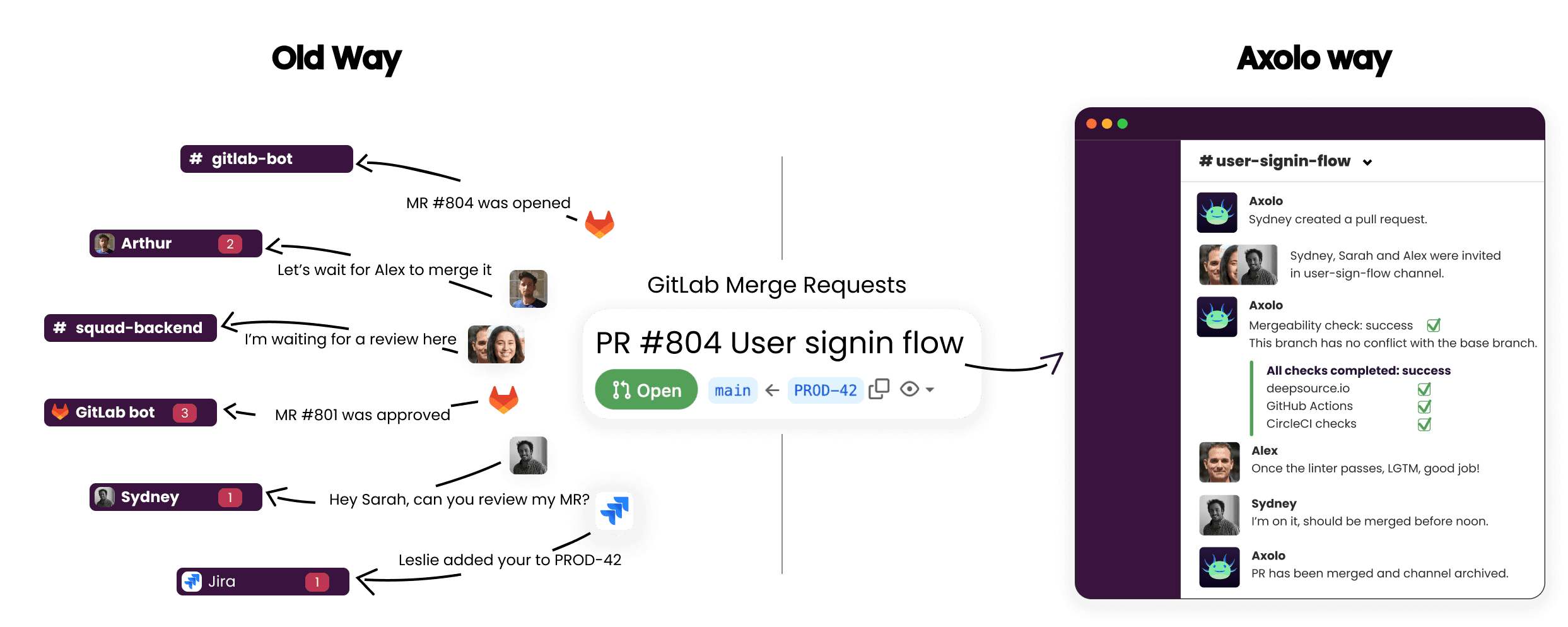
Managing stacked pull requests has never been easier than with Axolo. Axolo seamlessly integrates stacked PRs in GitHub and Slack, creating ephemeral Slack channels for every stacked PR. This allows developers and reviewers to communicate and collaborate on each PR independently, reducing confusion and ensuring faster reviews.
By organizing discussions into dedicated channels, Axolo empowers teams to focus on individual stack PR contexts without losing track of other pull requests. This streamlined communication significantly improves the review process, allowing teams to merge PRs faster.
With Axolo:
- Each stacked PR automatically generates a dedicated Slack channel for PR stacking.
- Communication is centralized, making it easier to share insights and resolve issues quickly.
- Teams can review, test, and merge GitHub stacked pull requests with greater speed and efficiency.
What is Axolo?
Axolo is a GitHub and GitLab Slack bot designed to enhance code reviews by creating instant, focused collaboration spaces for pull requests. Whether you're managing GitHub stacked PRs, handling GitHub Actions on pull request notifications, or following stacked diffs, Axolo ensures your team stays aligned and productive.
Key Features:
- 1 Pull Request = 1 Channel: Centralize discussions for every PR in ephemeral Slack channels.
- Customizable Notifications: Avoid overload with tailored updates on GitHub activity.
- Daily Summaries: Keep your team informed with daily PR recaps.
- CI/CD Integration: Monitor branch conflicts, pull request checks, and deployments directly in Slack.
Stacked PRs offer a more organized and efficient approach to code reviews, especially for larger projects. They align well with best practices for small, manageable changes, making the review process quicker and more thorough. GitHub's native stacks and tools like Graphite, Git Town, Sapling, ghstack and spr can further streamline this workflow.
By incorporating Stacked PRs and these tools into your development process, you can significantly improve code quality, reduce review time, and ultimately, deliver better software.
If you liked this article you might also like: How to review code in GitHub.
Axolo User Experiences
2480+ developers online